
Partner help center · Results and reports
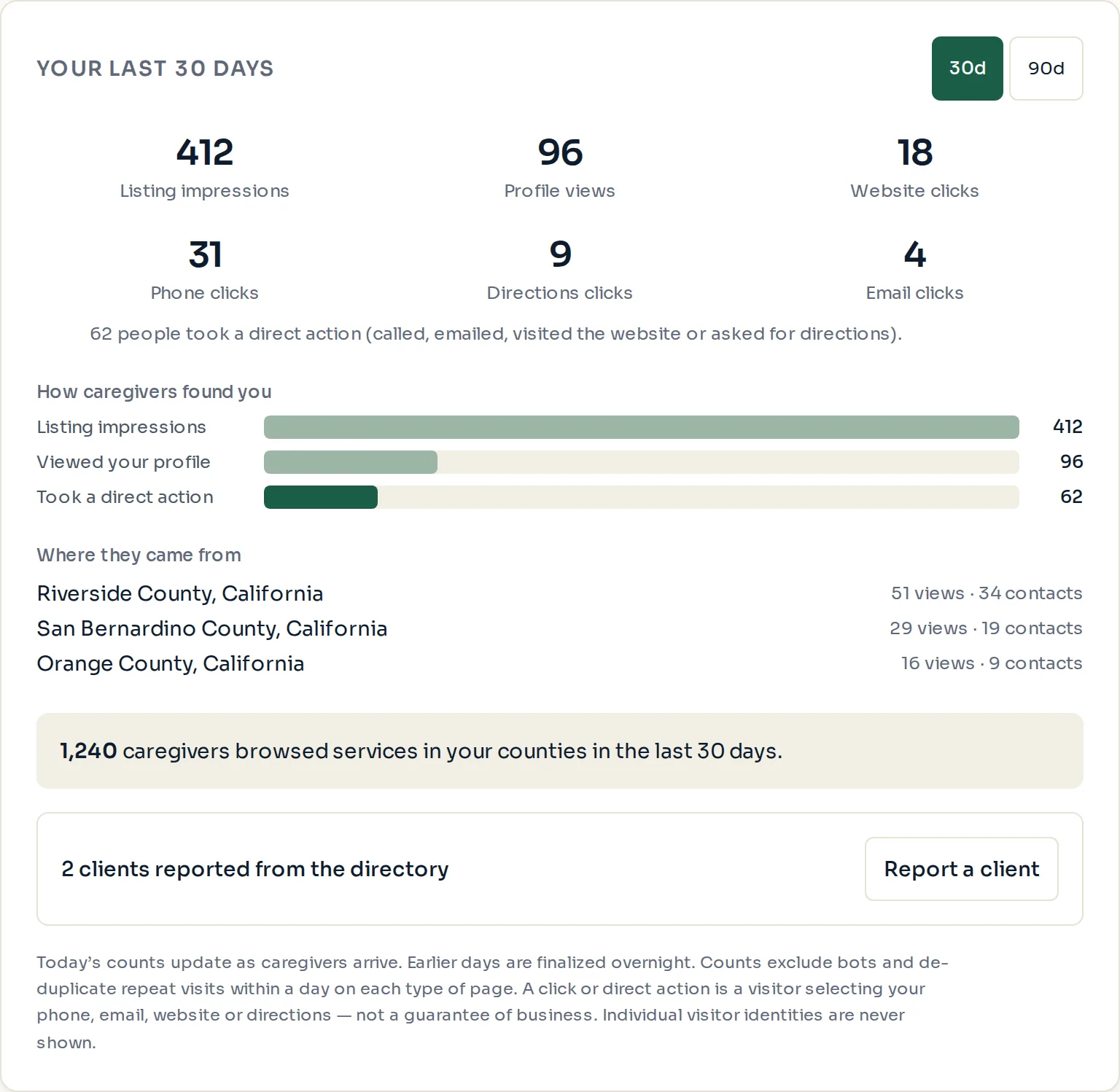
Read your performance numbers
Performance numbers come with the Verified and Featured plans. Sign in, open "Listing dashboard" and scroll to "Performance". A Basic listing sees a locked card that explains what the paid plans add.
The six counts
"Listing impressions": how many times your listing was shown anywhere on the site.
"Profile views": how many times someone opened your full profile page.
"Website clicks", "Phone clicks", "Directions clicks" and "Email clicks": how many times someone took that action from your listing. A phone click on a mobile phone starts a call.
Switch between the last 30 days and the last 90 days with the "30d" and "90d" buttons.
The funnel and the counties
"How caregivers found you" shows the path from impressions to "Viewed your profile" to "Took a direct action". A healthy listing turns a steady share of views into actions.
"Where they came from" lists the counties your visitors were in, with views and actions for each. If a county you serve never appears, check that it is selected under "Service areas".
The line under the counties, such as "1,240 caregivers browsed services in your counties", is the size of the audience in your area for the period.
- Counts only. The dashboard never shows who visited, their phone number, or anything from their eligibility check.
- Numbers update within a day. The month in progress is always labeled as still growing.
Paid placement never changes anyone's eligibility results. Read the advertising policy.